How I Deployed an AI Telegram Bot to AWS for Free
February 28, 2026 Telegram Aws Lambda S3 Ai
For over three years, I have been organizing volleyball games in our Telegram community. At first, we used standard Telegram polls, but the routine kept growing, so I decided to automate the process. That is how an AI-powered organizer bot was born, and the whole architecture is built around it.
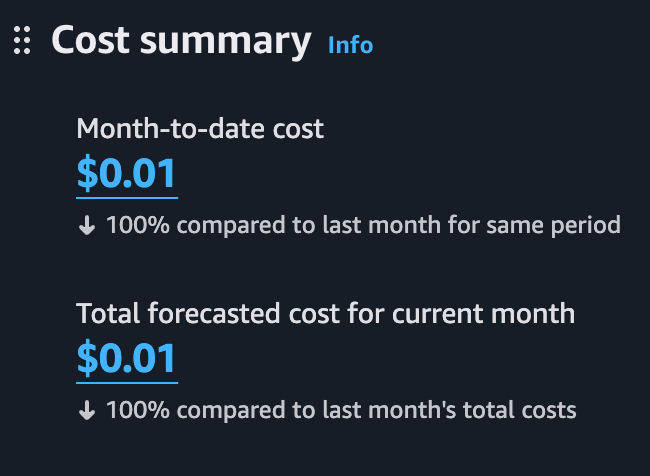
In this article, I will explain how this bot is designed, how I deployed it to AWS, and how I brought infrastructure cost down to zero by using AWS Free Tier and optimizing the app architecture. I have several similar bots for personal use and small communities. They all use the same techniques described below.

Organizer Bot Lifecycle
Before diving into hosting details, here is a quick overview of what the bot actually does. Its lifecycle consists of several stages:
- Creating a game poll with AI: In chat, I can send a simple message asking the bot to create a game poll (for example, “let’s play on Saturday”). Standing group facts live in long-term chat memory (venue, usual weekdays and time, price, known IBANs), so even a short hint is enough. Gemini fills in the rest from that memory, builds a poll-style message with action buttons, and posts it to the same chat/topic.
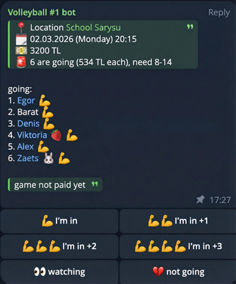
Changing game parameters on request: Over time, Telegram polls became limiting: changing a vote is inconvenient, you cannot vote for someone else, there is a 10-option limit, and the poll itself cannot be edited. But game state can change (payment received, game canceled, and so on). So I added an edit mode: with a regular chat message, the bot updates participants, payment status, and other game fields.
Voting: Participants tap buttons to join the game. AI is not involved at this stage - button clicks only update game state in cloud storage. Since we rent sports halls, the cost is split equally among participants. During voting, the bot recalculates per-person cost, sends updates to the chat, and keeps the main poll message up to date.
Poll checks: Several times per day, a scheduled task scans upcoming games and checks participant count. Every game has minimum and maximum thresholds. If there are enough people, the bot asks AI to generate a motivating message. If enough people have joined, it sends a regular reminder. If there are too many participants, it alerts the organizer.
Game completion: After a game ends, if it did not reach the required participant count and was not canceled, the bot sends a thank-you message and reminds participants about payment details.
Payment automation: This is the most interesting part. When someone transfers money to my account for hall rent, a scheduled Lambda function checks my mailbox (via Gmail API) for bank transfer notifications. The bot posts a successful payment update to chat, and AI tries to match the payer name from the bank receipt with a Telegram username, then marks payment status in game storage automatically.
All this logic requires compute, storage, and background jobs. But I wanted the infrastructure to stay completely free.
Project Architecture
The project is written in Go and consists of several components:
- Telegram Webhook Lambda - the main function that handles incoming Telegram messages and poll button clicks.
- Cron Lambdas - background jobs (for example, mail polling, pre-game and post-game notifications).
- AWS S3 - bot state storage (game data, participants, recent message history, and long-term chat memory).
Instead of clicking everything manually in the AWS console or scripting with AWS CLI, I used Terraform. It lets me define infrastructure as declarative code: Lambdas, Lambda schedules (EventBridge), IAM roles and access policies, and S3 buckets. I maintain two environments: dev and prod. A full environment can be provisioned from scratch with a single terraform apply command in a few minutes.
AWS Lambda Instead of a Persistent Server
The first and most important cost-saving step was replacing a constantly running server (a $2-$5/month VPS) with serverless compute. All bot components are deployed as Lambda functions.
AWS Lambda has a very generous free tier that is available continuously, not only for the first year:
- 1,000,000 free requests per month.
- 400,000 GB-seconds of compute time per month.
Communication with the bot works through a Telegram webhook: when a user sends a message, Telegram makes an HTTP request to the Function URL. Lambda acknowledges the update with 200 OK right away, then continues the real work on a second invocation with a longer timeout. With these limits, my function execution cost remains zero. For background tasks, I use Amazon EventBridge to trigger Lambdas on schedule.
How AI Works in My Bot
The webhook chat path is a small agent, not a JSON parser.
For a long time Gemini was a router: one GenerateContent call, one JSON document (new game, modified game, memory update, no reply, or plain HTML). Go parsed that document and did the side effects. Later I switched the same idea to Gemini function calling, but still as a one-iteration loop: execute every tool from that single response, then stop. That cannot do “create a poll and sign me up” — the model never sees the new poll message_id.
Now chat uses Google ADK for Go v2 (LlmAgent + Runner). The runner calls Gemini, runs tools against Telegram and S3 immediately, sends the function result back (including the new poll message_id), and lets the model call more tools. I cap this at 6 GenerateContent rounds so a stuck loop cannot blow the 120s webhook Lambda timeout. Several tool calls in one model response are executed in order.
The agent has five tools:
create_game— post one volleyball poll to Telegram, store it in S3, returnmessage_id. Call once per game; several calls schedule a week.update_game— patch one existing poll (message_idrequired): full participant list after the change, cancel/uncancel, paid flags, time, venue. Call once per game you change. Aftercreate_game, the next round canupdate_gamethe returnedmessage_id(for example to sign the requester up).upsert_memory— persist a standing group fact (venue, weekly schedule, default price/time, known IBAN, nickname). Not for one-off votes or this match’s roster.delete_memory— forget a fact by the existing CHAT MEMORYkey.send_reply— one Telegram HTML message covering the whole turn. At most once, and only after create/update/memory tools. Skip it for pure reactions.
No tools and no text means swallow the update. If the model still answers with a JSON blob or plain HTML instead of tools, that path is kept as a fallback.
Scheduled Lambdas (payment matching, unpaid reminders, team variants, “human” post-game texts) still use a single GenerateContent JSON/text call. They do not need a multi-step Telegram loop.
Context and model
AI gets context from the latest 50 bot-related messages in each chat (mentions of the bot username or replies to bot messages). This history is stored in S3 as a JSON array, decoded into Gemini content, and seeded into an in-memory ADK session for that Lambda invocation. It is a working window of the conversation, not a knowledge base: facts in it go stale, and you cannot update or forget a single group rule without rewriting the transcript.
The bot did not always run on Gemini - I originally used ChatGPT. Later I switched to Gemini because Google’s offering became more attractive: a free tier for Flash models and a more convenient API.
Right now the model is gemini-3-flash-preview.
Dynamic chat memory
I used to bake standing group knowledge into the system prompt: indoor venue, Monday and Wednesday at 20:15, default price, known IBANs. That worked for one chat and fell apart as soon as a second group appeared or the hall changed.
Now each Telegram chat has its own long-term memory in S3 (state/chat_memory.json), separate from the 50-message window. A fact is a snake_case key, human-readable text (HTML links are allowed), and updated_at. There is a cap of 40 facts per chat; the oldest one is dropped when the limit is hit. Reads and writes reuse the same lazy GET, in-memory mutation queue, and ETag CAS pattern as game state, so an extra JSON file does not blow the S3 quota.
Gemini sees a CHAT MEMORY block in every prompt that needs group knowledge: creating and editing games, ordinary replies, payment matching from bank emails, pre-game team variants, and post-game reminders. If the user omits a detail, the model fills it from memory instead of inventing a venue or IBAN. If memory is empty, it uses conservative fallbacks (8-14 players, 20:00, empty location and price).
Memory changes through the same ADK tools, not through a separate JSON type:
- Explicit remember/forget. If someone writes “запомни”, “forget”, or “теперь зал вот этот”, the model calls
upsert_memoryordelete_memoryand maysend_replywith a short confirmation. - Silent inference. If it notices a durable group rule while creating a game, it can call
upsert_memoryin the same turn without a separate “I remembered” message. One-off votes and one-off payments are not stored.
The Go handler sanitizes keys, applies the ops to that chat’s fact list, and saves once at the end of the Lambda.
The original Volleyball #1 chat was bootstrapped with a one-time seed of the old hardcoded defaults. After that, those defaults left the prompt, and the group can change them in chat.
More “human” responses
To avoid robotic replies, different Lambda functions generate varied texts from templates. For example, after a game ends, the bot sends a summary message and sometimes adds a short joke (usually not very funny).
AI for payment recognition
AI is also used in payment recognition. The flow is: someone from the team (usually me) pays for the hall, then after the game the total is split by the actual number of players, and everyone transfers their share to the person who paid. The bank sends incoming transfer notifications to my Gmail inbox, and a separate scheduled Lambda reads those emails through Gmail API using filtered queries.
Then AI receives a specialized request: based on the participant list and payment description, it must detect the most likely payer and return a confidence score from 0 to 1. If confidence is >= 0.6, the payment is considered matched: the participant is marked as paid in game data, and the actual paid amount is saved (important because people sometimes underpay or overpay).
One more context detail: if there is an active game poll in a chat, AI always receives full game data in its system prompt. For example, the bot can split participants into two teams on request or generate a targeted announcement when needed.
Response formatting
One practical detail: models tend to output Markdown by default, but Telegram MarkdownV2 is fragile and often breaks on unescaped symbols. So I explicitly instruct the model to format replies in HTML (<b>, <i>, <code>), which significantly reduces formatting errors.
Gemini API pricing
At the moment, gemini-3-flash-preview is used in paid tier billing, where cost is calculated mainly by input and output tokens (rough reference: about $0.50 per 1M input tokens and $3.00 per 1M output tokens, plus cheaper cached input - a reused part of chat context that is billed at a lower rate). For up-to-date rates and changes, I always rely on Google’s official pricing page: Gemini Developer API Pricing.
In my case, monthly AI spending is usually small because requests are relatively infrequent. In many months, usage still fits into the Gemini API free tier for Flash models (Google AI Studio free tier), and paid usage appears mostly during more active periods.
Optimizing Telegram Interaction
Even with 1 million monthly calls, those calls should be used carefully. I reduced Lambda wake-ups as much as possible by configuring Telegram itself.
1. Webhook update filtering (allowed_updates)
When you set a webhook URL for a Telegram bot, Telegram sends all update types by default: bot added to channel, chat status changes, edited messages, and so on. Each event wakes up Lambda and spends your free quota.
I fixed this by explicitly listing only relevant event types. In setWebhook, I pass allowed_updates and limit updates to new messages and inline button presses.
Webhook setup example with curl:
curl -X POST "https://api.telegram.org/bot<YOUR_BOT_TOKEN>/setWebhook" \
  -H "Content-Type: application/json" \
  -d '{
    "url": "https://<your-lambda-url>",
    "allowed_updates": ["message", "callback_query"]
  }'
More details about allowed_updates are available in the official Telegram Bot API docs.
Now Telegram filters “noise” on its side, and my function runs only for meaningful events.
Also, keep HTTP status behavior in mind: for Telegram, only 2xx means successful delivery. If your function returns 4xx/5xx or times out, Telegram will retry the update many times. Telegram waits about 60 seconds for that HTTP response. An ADK turn with several Gemini rounds plus Telegram API calls can easily exceed that, even though AWS Lambda itself can run much longer.
The Function URL handler therefore does not process the update on the HTTP request. It wraps the Telegram body in a small envelope (type: telegram-update) and asynchronously invokes the same Lambda (InvocationTypeEvent). Then it returns 200 OK to Telegram immediately. The second invocation is not bound by Telegram’s wait: it has a 120 second timeout, runs the ADK loop, writes S3, and talks to Telegram Bot API. If self-invoke fails, the first invocation falls back to processing inline so updates are not dropped.
That extra invoke still counts as one Lambda request, which is cheap under the 1 million free calls. The IAM role allows lambda:InvokeFunction only on this function’s own ARN.
The worker still returns 200 after handling (and on invalid Telegram JSON too), so a rare inline fallback never triggers Telegram retries.
At the time I built this bot, the most popular Go Telegram bot library did not support forum topics, while our chat relies on topics heavily. So I forked it and added topic support in my version: github.com/antelman107/telegram-bot-api.
2. Privacy Mode
Many users add bots to group chats. Without proper configuration, a bot can receive updates for every message posted by anyone in the group. This can burn through your Lambda quota very quickly.
To avoid that, I enabled Privacy Mode via @BotFather. With this setting, bots do not receive updates for messages that are not directed to them. The bot reacts only to slash commands (/) or explicit mentions (@BotName).
State Storage in AWS S3
Telegram bots need to store conversation context and user settings. Using a classic database (for example, RDS) for this can be too expensive.
Instead, I store bot state as regular files in AWS S3. S3 also has a good Free Tier (valid for the first 12 months for new accounts):
- 5 GB of Standard storage.
- 20,000 GET requests per month.
- 2,000 PUT, COPY, POST, or LIST requests per month.
Even after the 12-month free tier ends, S3 pricing for typical Telegram bots remains tiny (prices can vary by region; numbers below are for us-east-1):
- Data storage: ~$0.023 per 1 GB/month. Bot state files usually occupy only a few megabytes (less than a cent per month).
- Write requests (PUT): $0.005 per 1,000 requests.
- Read requests (GET): $0.0004 per 1,000 requests.
So even if your bots make, say, 10,000 writes and 50,000 reads per month after the first year (I still do not reach that across all my bots), it is about $0.07/month. That is still practically “zero cost” compared to renting any server.
Still, in the first year the main bottleneck is the 2,000 PUT request limit. If the bot saves state after every message, this limit is reached very quickly. Extra requests are billed (those same half-cent per thousand writes).
Minimizing S3 Requests
To stay within free limits and reduce S3 calls, I use two main patterns:
Lazy Initialization: The bot does not read state from S3 on every request. State is loaded only when a user command actually needs context checks or modifications. If a user sends a simple command like
/help, the bot answers instantly without any S3 GET requests.Optimistic Locking and ETag: When state changes in memory, the bot does not immediately write to S3. Save happens only at the end of request processing. Using optimistic locking, the bot compares the updated state with the original one.
In S3, this works well with ETag (Entity Tag). ETag is a content hash (usually MD5) that S3 returns in response headers for each GET request.
The workflow:
- On state read (GET), the bot stores the current file ETag.
- During request handling, state can be modified in memory.
- Before saving, the bot serializes new state to JSON and computes its hash. If the new hash equals the original one, there are no real changes (even if in-memory objects were recreated), so the PUT request is skipped to save quota.
- If state changed, the bot sends PUT with original ETag in
If-Match(available in S3 under certain versioning setups, or emulated logically). This protects from race conditions when two Lambdas try to save state at the same time. The first write succeeds (ETag changes), the second gets an ETag mismatch and does not overwrite newer data, then can re-read state or skip save.
Conclusion
Moving bots to a serverless stack fully paid off. Infrastructure on AWS Lambda + S3 + Terraform runs fast, does not require server maintenance, and in my case stays around ~$0 per month.
AI plays a central role in this system: Google ADK drives chat with real tools (create_game, update_game, upsert_memory, delete_memory, send_reply), payment matching still uses a scored JSON call, and scheduled Lambdas keep messages from sounding robotic. Combined with Telegram webhook filtering (allowed_updates), idempotent request handling, topic support, long-term chat memory in S3, and efficient state management (lazy loading + ETag), the bot evolved from a simple “poll button” into an autonomous game organizer assistant.
Test Your Knowledge
Related Articles
From AWS Lambda to Cloudflare Workers: free tiers and cold starts

In the previous article I described how I fitted a Telegram volleyball organizer bot into the AWS Free Tier: Lambda + S3 + EventBridge, at about zero dollars. That setup ran for months. Then I moved the same bot to Cloudflare Workers and R2 — the same Go, the same JSON state files, the same Gemini router.
Read More → Telegram Aws Lambda S3 Cloudflare Workers R2 GoDeploying Telegram Bot to AWS Lambda with Function URL
This article is a continuation of “Building an AI Telegram Bot with Go, Gemini API, and AWS Lambda” and contains detailed instructions for setting up and deploying a Telegram bot to AWS Lambda using Function URL.
Read More → Go Telegram Aws Lambda Deploy Function-Url CliBuilding an AI Telegram Bot with Go, Gemini API, and AWS Lambda
In this article, we’ll explore how to build an intelligent Telegram bot using Go that acts as a proxy between users and Google’s Gemini API. The bot will handle two primary functions: answering user messages and generating images. While this mechanism can be significantly extended with additional capabilities like voice and video generation, we’ll focus on these two request types for simplicity.
Read More → Go Telegram Gemini Ai Aws Lambda Bot